🎉Fall Sale - Limited Stocks!
🥇 America’s Top-Rated Massage Chair Brand
🚚 Free Fast U.S. Shipping
🎁 3 Year Warranty + No Sales Tax
🎖️ Exclusive Military Massage Chair Discount
🎉Fall Sale - Limited Stocks!
🥇 America’s Top-Rated Massage Chair Brand
🚚 Free Fast U.S. Shipping
🎁 3 Year Warranty + No Sales Tax
🎖️ Exclusive Military Massage Chair Discount
🎉Fall Sale - Limited Stocks!
🥇 America’s Top-Rated Massage Chair Brand
🚚 Free Fast U.S. Shipping
🎁 3 Year Warranty + No Sales Tax
🎖️ Exclusive Military Massage Chair Discount
🎉Fall Sale - Limited Stocks!
🥇 America’s Top-Rated Massage Chair Brand
🚚 Free Fast U.S. Shipping
🎁 3 Year Warranty + No Sales Tax
🎖️ Exclusive Military Massage Chair Discount
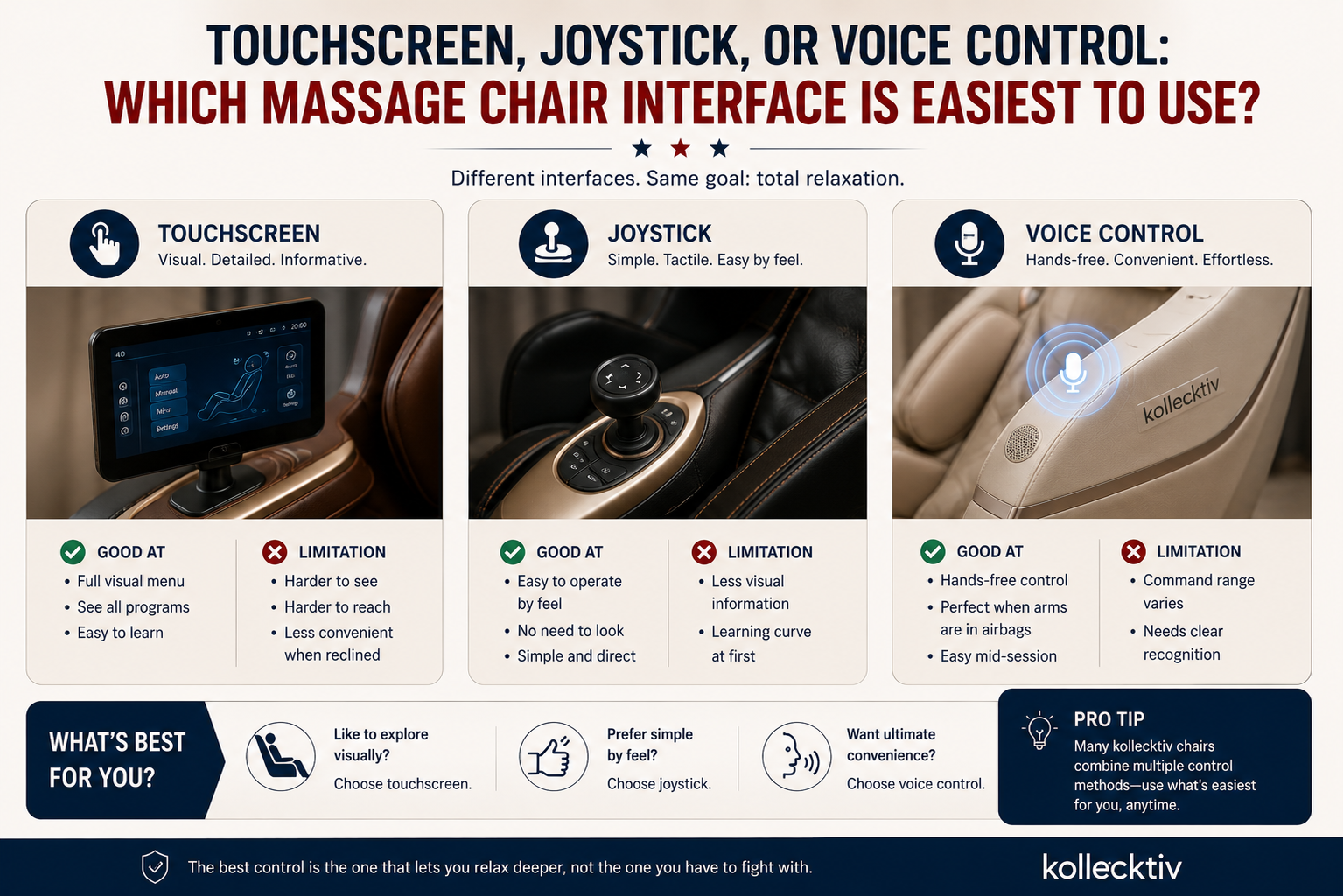
Quick answer: there’s no universally “best” control method, but each one fits a different situation. A touchscreen gives you the most visual menu options but is the hardest to use once you’re fully reclined and can’t easily see the screen. A joystick is simpler to operate by feel, without needing to look at anything. Voice control is the most convenient when your arms are already resting under the armrests mid-massage. The right choice usually comes down to how reclined you’ll typically be and whether reaching or viewing a screen is comfortable for you.
This is a detail shoppers tend to skip over while comparing massage programs and airbag counts, then notice immediately once the chair is in their living room. Here’s how the three main control types actually compare in daily use.
Why Control Method Matters More Than It Seems
A massage chair’s controls aren’t just a settings menu, they’re something you interact with while reclined, often with your eyes closed or your body partly immobilized by airbags. That changes the calculus compared to, say, choosing a TV remote. A touchscreen you’d find perfectly intuitive sitting upright becomes harder to read and tap accurately once you’re leaned back in zero gravity. A voice command that feels natural when your hands are free becomes genuinely useful when your arms are pinned under compression airbags and reaching for anything is awkward.
For most buyers, this only becomes obvious after a few sessions. Thinking through it ahead of time, especially if you know you’ll be using the chair daily or if dexterity is a consideration for you or another household member, is worth the few extra minutes during research.
Touchscreen Controllers: What They’re Good At, and Where They Fall Short
Direct answer: touchscreens offer the most visual, menu-driven control, which makes them easy to understand the first time you use the chair, but they require you to sit forward enough to see and reach the screen clearly, which is less convenient once you’re reclined.
Most full-feature massage chairs, Kollecktiv’s included, use a handheld or armrest-mounted touchscreen as the primary interface. You can see every program, intensity level, and setting laid out visually, which is genuinely helpful when you’re still learning what a chair can do. The tradeoff shows up later: in a deep recline, the screen is harder to angle toward you, buttons can be smaller than they feel when you’re not lying back, and locating a specific setting without looking becomes difficult.
Joystick Controls: Simpler, Less Visual
Direct answer: a joystick-based control system trades visual menus for tactile, physical input, which some users find easier to operate by feel once reclined, without needing to see a screen at all.
Instead of navigating menus, a joystick lets you push, tilt, or press in a direction to adjust intensity, switch modes, or move between settings. There’s less to look at and less precision required to hit a small on-screen button. The tradeoff is the opposite of a touchscreen’s: you get less visual information about what each setting does, so there’s more of a learning curve the first few times, even though day-to-day operation can end up feeling more natural once you’re used to it.
Voice Control: Convenient, With Some Caveats
Direct answer: voice control lets you start programs, adjust intensity, or change positions without touching anything, which is the most hands-free option, but how well it works in practice depends on how many commands the system recognizes and how precisely you need to phrase them.
This is genuinely useful mid-session, when your arms are under airbag compression or you simply don’t want to move. The caveat is that voice systems vary in command range. Some support a fairly wide vocabulary of control commands, while others only recognize a narrower set of specific phrases. If voice control is a priority for you, it’s worth checking how many commands a specific chair supports rather than assuming all voice-controlled chairs work the same way.
Comparing the Three Control Types
Control Type
Best For
Main Drawback
Touchscreen
Learning the chair’s full feature set visually
Harder to see and reach accurately once fully reclined
Joystick
Operating by feel without needing to look
Less visual feedback, more of a learning curve at first
Voice control
Hands-free adjustment mid-session
Command range and recognition accuracy vary by chair
In practice, most full-featured chairs combine more than one of these, so you’re rarely choosing only one method permanently. The question is usually which one you’ll default to for everyday use.
What About Limited Dexterity or Vision?
If you or someone in your household has limited hand dexterity, arthritis, or difficulty with small touchscreen buttons, a joystick or voice-driven system is generally easier to manage than a small-button touchscreen, since both require less fine motor precision. For vision-related considerations, voice control removes the need to read a screen entirely, while a joystick still relies on some tactile memory of what each direction does.
This is worth raising directly with customer support before ordering if it’s a deciding factor, since control layouts can differ between models even within the same brand.
Which Kollecktiv Models Use Which Control Method
Kollecktiv’s current lineup generally falls into two groups on this question.
Most models, including the Kollecktiv G18, use a touchscreen controller paired with a shortcut panel and AI voice control, giving you the choice of visual menus, quick-access buttons, or spoken commands in the same chair. The flagship Kollecktiv 301 extends this further with a wider range of recognized voice commands, which is worth knowing if voice control specifically is your priority.
A smaller group of models uses a joystick-based system instead. The Kollecktiv G12 is built around a smart joystick with a rotating phone holder rather than a touchscreen as the primary control, which some users find more manageable once reclined, since there’s less need to locate and press a small on-screen button.
If you’re comparing models with control methods as a genuine priority, it’s worth checking the specific product page for each chair you’re considering rather than assuming every model in Kollecktiv’s current lineup controls the same way. Browsing the 4D Massage Chairs collection or the Massage Chair Collection page lets you compare the listed control features side by side before narrowing down.
Can You Combine Control Methods?
In most cases, yes. A chair with a touchscreen and voice control gives you the option to use whichever is more convenient in the moment, visual menus when you’re upright and still exploring settings, voice commands once you’re reclined and don’t want to reach for anything. This flexibility is one reason a combined system, rather than a single control method alone, tends to suit the widest range of users and situations.
A Few Questions Worth Asking Before You Buy
How many voice commands does the system recognize, and are they natural phrases or specific required wording?
Is the touchscreen handheld, or mounted to the armrest?
Does the chair offer more than one control method, or only one?
If dexterity or vision is a consideration for the primary user, has that been factored into which chair you’re comparing?
If you’re still early in the buying process and want a broader framework for evaluating a chair beyond controls, Kollecktiv’s guide to evaluating 4D massage chairs covers the rest of the decision in more depth.
Frequently Asked Questions
Is touchscreen or joystick control better for a massage chair?
Neither is universally better. A touchscreen offers more visual information, which helps when you’re learning the chair’s features. A joystick is simpler to operate by feel once reclined, without needing to look at a screen.
Does voice control actually work well on a massage chair?
It generally works well for straightforward commands like starting a program or adjusting intensity, though accuracy and the range of recognized phrases vary by chair. Checking how many voice commands a specific model supports is the best way to know what to expect.
Which control method is easiest for seniors?
This depends on the individual, but voice control and joystick systems are often easier than a small touchscreen for users who have difficulty with fine motor precision, since neither requires accurately tapping a small button.
Can I use a massage chair’s touchscreen while reclined?
You can, but it’s less convenient than when sitting upright, since the screen is harder to angle toward you and buttons are smaller to target accurately in that position.
Do all massage chairs offer more than one control method?
No. Some models rely primarily on one method, such as a joystick, while others combine a touchscreen, shortcut panel, and voice control in the same chair. Check the specific product page to see what’s included.
Control method is one factor among several when choosing a massage chair. It’s worth weighing alongside fit, massage features, and space requirements rather than as the only deciding factor.